Objective Function Overview | ||||||||
|
| |||||||
These results are combined to scalar values using the so-called 'design responses.' Initially,
one or several responses for the objective function must be defined using the command
DRESP. These responses are then added to the objective, as seen in the
following figure:
 |
Weight and reference values can be applied in the combination using
the command OBJ_FUNC.
OBJ_FUNC
 ID_NAME = ...
 DRESP   = id_name_1, WEIGHT, REFERENCE
 DRESP   = id_name_2, WEIGHT, REFERENCE
 DRESP   = id_name_3, WEIGHT, REFERENCE
 DRESP   = id_name_4, WEIGHT, REFERENCE
 ...
 TARGET  = MIN | MAX | MINMAX | MAXMIN
END_
- The
ID_NAMEof theOBJ_FUNCmust be referenced in theOPTIMIZEcommand to activate the objective function. - The
WEIGHTandREFERENCEvalues are optional. - The default weighting factor is
and the default reference value is
.
Important: - For controller-based shape optimization the reference value (
) has a special meaning.
The reference value is the value around which
Tosca Structure
homogenizes the stress. Thus, a value
usually does not make sense and
Tosca Structure
calculates a default reference value if
REFERENCE( ) is unset. The reference calculated can be seen inTOSCA.OUT:
- For controller-based shape optimization the user must either set
all
REFERENCE-values or none at all (automatic reference value calculation).
- For controller-based shape optimization the reference value (
) has a special meaning.
The reference value is the value around which
Tosca Structure
homogenizes the stress. Thus, a value
usually does not make sense and
Tosca Structure
calculates a default reference value if
- The user does not need to define
WEIGHTandREFERENCEfor the most common optimization formulations. The default values ofWEIGHT=1.0andREFERENCE=0.0are good settings for most common cases. - The command
TARGETcan be set toMIN,MAX,MINMAX, orMAXMIN, indicating if the objective function is minimized or maximized or if a min-max or a max-min formulation is used.Important: - The reference value for the
MINMAXfunction differs from the above definition by eigenfrequency optimization for the sensitivity-based algorithm. MAXMINis not allowed for eigenfrequency optimization.- The reference value for von Mises stresses in topology optimization differs from the above definition.
- The reference value for the
- The design responses
listed in
OPTIMZEare summed up taking into account the individual weighting and reference values ifTARGETis set toMINorMAX. - A min-max / max-min formulation is applied if
TARGETis set toMINMAX / MAXMIN. Then the design responses are dealt with individually in a multidisciplinary optimization taking into account the individual weighting and reference values.
In the log file TOSCA.OUT the object function value can
be monitored:
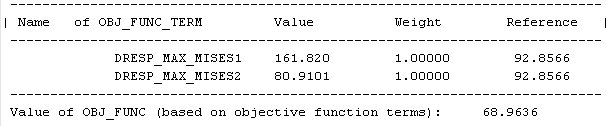
In the above example, the total objective function is , the DRESPs have values and .
Also the above example shows the weight and reference value of each
term. These values can also be found in two extra log-files, optimization_report.csv
and optimization_status_all.csv. The first file only
lists DRESPs that are included in the optimization task
as objective function or constraint. The latter lists all DRESPs
defined in the parameter file.
Example
The following figure shows the optimization_report.csv imported into a spread
sheet:

- In the above example, first the total objective function is listed for each iteration as MINIMIZE_MAX_MISES. The objective function is always the first column.
- Then each
DRESPin the and are listed as OBJ_FUNC_DRESP:DRESP_MAX_MISES1 and OBJ_FUNC_DRESP: DRESP_MAX_MISES2. - After each
DRESPthe terms are listed: OBJ_FUNC_TERM:DRESP_MAX_MISES1 and OBJ_FUNC_TERM: DRESP_MAX_MISES2.
The terms include weight and reference value and are given as:
If constraints are defined in the optimization task, these are also included in
optimization_report.csv and
optimization_status_all.csv.
Remarks
- For controller-based shape optimization, the "reference value" has a special meaning and is very important. See "Reference Stress" in the shape optimization section "Objective Function for Controller-Based Shape Optimization."
- For all other optimization approaches, the reference value and weight is only of limited importance. A case for using weights in sensitivity-based optimization is when you use two different types of DRESPs in the objective function and they might have very different value intervals. This is not recommended and in most cases you have a better optimization setup using one type of DRESP in OBJ_FUNC and the others as constraints.