Currently you can specify only the contact surface weighting and polarity for the general
contact algorithm. The contact formulation propagates through all analysis steps in which
the general contact interaction is active.
The surface names used to specify the regions where a nondefault contact formulation should
be assigned do not have to correspond to the surface names used to specify the general
contact domain. In many cases the contact interaction will be defined for a large domain,
while a nondefault contact formulation will be assigned to a subset of this domain. Any
contact formulation assignments for regions that fall outside the general contact domain
will be ignored. The last assignment will take precedence if the specified regions overlap.
This option must be used in conjunction with the CONTACT option. It should appear
at most once per step for each value of the
TYPE parameter; the data line can be
repeated as often as necessary to assign contact formulations to different regions.
Abaqus/CAE Usage
Interaction module: Create Interaction: General contact (Explicit): Contact Formulation
Contact Surface Weighting
Generally, contact constraints in a finite element model are applied in a discrete manner,
meaning that for hard contact a node on one surface is constrained to not penetrate the
other surface. In pure main-secondary contact the node with the constraint is part of the
secondary surface and the surface with which it interacts is called the main surface. For
balanced main-secondary contact Abaqus/Explicit calculates the contact constraints twice for each set of surfaces in contact, in the form
of penalty forces: once with the first surface acting as the main surface and once with the
second surface acting as the main surface. The weighted average of the two corrections (or
forces) is applied to the contact interaction.
Balanced main-secondary contact minimizes the penetration of the contacting bodies and,
thus, provides better enforcement of contact constraints and more accurate results in most
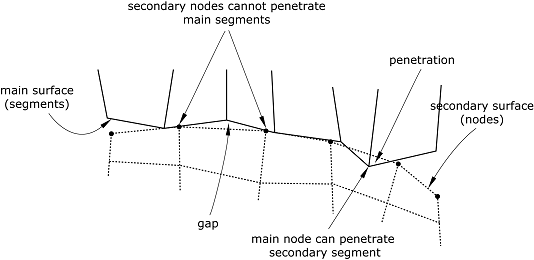
cases. In pure main-secondary contact the nodes on the main surface can, in principle,
penetrate the secondary surface unhindered (see Figure 1).
Figure 1. Main surface penetrations into the secondary surface in pure main-secondary contact
due to coarse discretization.
The general contact algorithm in Abaqus/Explicit uses balanced main-secondary weighting whenever possible; pure main-secondary weighting
is used for contact interactions involving node-based surfaces, which can act only as pure
secondary surfaces and for contact interactions involving analytical rigid surfaces, which
can act only as pure main surfaces. Surface-based cohesive behavior and no-separation
behavior (without rough friction) use a pure main-secondary algorithm by default (see Considerations for Contact Cohesive Behavior and No-Separation Behavior). You can choose to specify a pure
main-secondary weighting for other interactions as well.
There is no main-secondary relationship for edge-to-edge contact; both contacting edges are
given equal weighting.
Specifying Pure Main-Secondary Weighting for Node-to-Face Contact
You can specify that a general contact interaction should use pure main-secondary
weighting for node-to-face contact. This specification has no effect on edge-to-edge
contact and cannot be used to make a node-based surface act as a main surface. When two
originally flat surfaces contact one another, a more uniform penetration distance
distribution (and consequently pressure distribution) might result with pure
main-secondary weighting where the more refined surface acts as the secondary surface as
compared to balanced main-secondary weighting. This can be particularly evident if the
mesh densities of the contacting surfaces differ significantly—with balanced weighting the
contact penetrations will be smaller near the nodes of the coarsely meshed surface.
Abaqus/Explicit automatically generates contact exclusions for the main-secondary orientation opposite
to that specified. For example, specifying that the general contact interaction between
surf_A and surf_B should use pure
main-secondary weighting with surf_A considered to be the
secondary surface results in exclusions being generated internally for faces of
surf_A contacting nodes of surf_B.
However, if surf_A and surf_B
overlap such that node-to-face self-contact exists, the balanced main-secondary weighting
is used within the overlap region of surf_A and
surf_B. Abaqus/Explicit issues a warning message if the second surface name is omitted or is the same as the
first surface name because this input would result in node-to-face self-contact for the
surface. If the secondary surface (surf_A) continuously resides
within a larger surface that is defined within the contact domain, it is possible for
nodes of the main surface (surf_B) to contact faces that are
adjacent to surf_A. Therefore, the "perimeter" region of
surf_A would tend toward a balanced main-secondary weighting
(rather than a pure main-secondary weighting).
Input File Usage
Use the following option to indicate that the first surface should be considered the
secondary surface (default):
If the first surface name is omitted, a default surface that encompasses the entire
general contact domain is assumed. The second surface name must be specified.
Abaqus/CAE Usage
Interaction module: Create Interaction: General contact (Explicit): Contact Formulation: Pure main-secondary assignments: Edit: select the surfaces in the columns on the left, and click the arrows in the middle to transfer them to the list of main-secondary assignments.
In the First Surface Type column, enter SECONDARY to indicate that the first surface should be considered the secondary surface, and enter MAIN to indicate that the first surface should be considered the main surface.
Considerations for Contact Cohesive Behavior and No-Separation Behavior
Pure main-secondary roles are assigned for contact cohesive behavior and no-separation
behavior by default to avoid locking mechanisms that often occur for bonded interfaces
under bending. The first surface specified in the assignment of a cohesive contact
property assignment acts as the secondary surface by default. For no-separation behavior,
the secondary surface is assigned to be the more refined surface; if both surfaces are
equally refined, the first surface specified is assigned to be the secondary surface.
You can override the default by directly specifying which surface should act as the
secondary surface or that balanced main-secondary weighting should be used.
Input File Usage
Use the following option to indicate that a balanced main-secondary formulation
should be considered (default):
If the first surface name is omitted, a default surface that encompasses the entire
general contact domain is assumed. In this case you must specify the second surface
name.
Abaqus/CAE Usage
The alternative interface to control main-secondary roles is not supported in Abaqus/CAE.
Contact Surface Polarity
By default, general contact considers both sides of all double-sided elements in surfaces
specified to be included for contact purposes (side labels of double-sided elements are
ignored). This default can be overridden for node-to-face and Eulerian-Lagrangian contact
and in some cases results in more accurate enforcement of contact.
Surface polarity is not considered for edge-to-edge contact, including edges activated on
faces of solid elements.
Specifying Surface Polarity for Node-to-Face and Eulerian-Lagrangian Contact
Changing the polarity of double-sided elements forces the contact algorithm to treat them
as if they were solid elements. More accuracy might be gained by converting double-sided
elements to single-sided if there is a chance that secondary nodes might be “caught”
behind the surface in node-to-face contact or if material contained on one side of a
double-sided surface leaks to the other side in Eulerian-Lagrangian contact. Improvements
in performance and memory use might also be observed with Eulerian-Lagrangian contact if
double-sided Lagrangian surfaces are converted to single-sided for contact with all
Eulerian material surfaces.
Input File Usage
Use the following option to indicate that the sides of the (double-sided) elements
specified in the second surface's definition should be considered for contact with the
first surface:
Use the following option to indicate that the SPOS
side of the (double-sided) elements in the second surface should be considered for
contact with the first surface:
Use the following option to indicate that the SNEG
side of the (double-sided) elements in the second surface should be considered for
contact with the first surface:
Use the following option to indicate that both sides of the (double-sided) elements
in the second surface should be considered for contact with the first surface:
If the first surface name is omitted, a default surface that encompasses the entire
general contact domain is assumed. The second surface name must be specified.
Abaqus/CAE Usage
Interaction module: Create Interaction: General contact (Explicit): Contact Formulation: Polarity assignments: Edit: select the surfaces in the columns on the left, and click the arrows in the middle to transfer them to the list of polarity assignments.
In the Second Surface Type column, enter SPOS to indicate that the SPOS side of the (double-sided) elements in the second surface should be considered for contact with the first surface, enter SNEG to indicate that the SNEG side of the (double-sided) elements in the second surface should be considered for contact with the first surface, and enter TWO_SIDED to indicate that both sides of the (double-sided) elements in the second surface should be considered for contact with the first surface.
Sliding Formulation
Currently only the finite-sliding formulation is available for general contact in Abaqus/Explicit. This formulation allows for arbitrary separation, sliding, and rotation of the surfaces
in contact. For cases in which small-sliding or infinitesimal-sliding assumptions would be
preferred, the contact pair algorithm should be used (see Contact Formulations for Contact Pairs in Abaqus/Explicit).
Abaqus/Explicit is designed to simulate highly nonlinear events or processes. Because it is possible for
a node on one surface to contact any of the facets on the opposite surface, Abaqus/Explicit must use sophisticated search algorithms for tracking the motions of the surfaces. The
finite-sliding contact search algorithm is designed to be robust, yet computationally
efficient. This algorithm assumes that the incremental relative tangential motion between
surfaces does not significantly exceed the dimensions of the main surface facets, but there
is no limit to the overall relative motion between surfaces. It is rare for the incremental
motion to exceed the facet size because of the small time increment used in explicit dynamic
analyses. In cases involving relative surface velocities that exceed material wave speeds it
might be necessary to reduce the time increment.
The contact search algorithm uses a global search when a contact interaction is first
introduced, and a hierarchical global/local search algorithm is used thereafter. No user
control of the search algorithm is needed.
Local Tangent Directions for Contact
Local tangent directions for contact provide a reference frame for select general contact
output variables in Abaqus/Explicit (see About General Contact in Abaqus/Explicit). These local tangent directions are
separate from local coordinate systems associated with user subroutines VFRICTION and VUINTERACTION. Abaqus/Explicit establishes and updates the orientation of the first local contact tangent direction, , at secondary nodes and edge nodes according to the logic described below
for different contact formulation types within general contact. The orientation of the
second local tangent direction, , is found as the cross product of the contact normal direction, with . A change in the predominant contact formulation type that is active at a
node might lead to a sudden change in the local tangent directions.
Finite-sliding, node-to-surface formulation for nonanalytical
surfaces
The -direction is initialized at a secondary node on first contact using
the standard convention for calculating a first local surface tangent direction (see
Conventions) or using
the user orientation specified through the option SURFACE PROPERTY ASSIGNMENT,
PROPERTY=ORIENTATION
(applicable only for nodes belonging to an element-based surface). In subsequent
increments, if the secondary node belongs to an element-based surface, the -direction rotates with the secondary surface for geometrically
nonlinear analyses; otherwise, the standard convention is used.
Finite-sliding, node-to-surface formulation with an analytical
surface
The -direction for contact is initialized at a secondary node on first
contact to be aligned with the convention for the -direction of the analytical rigid surface discussed in Analytical Rigid Surface Definition at the
point of contact. In subsequent increments, the -direction for contact at a secondary node evolves such that it
continues to be aligned with the -direction of the analytical rigid surface at the current point of
contact.
Finite-sliding, edge-to-edge formulation
The -direction for an edge-to-edge contact constraint is initialized on
first contact to be in the axial direction of one of the edges involved in the contact
and will evolve to remain aligned with the axial direction of this edge until a local
transition to another edge occurs, and then the axial direction of that edge will be
adopted as the -direction.
Local surface tangent directions will often differ across a contact interface. For example,
respective local -directions (CTANDIR1) on
opposite sides of an interface will evolve differently if surface rotations across the
interface are not the same. The respective local -directions (CTANDIR2) on
opposite sides of an interface are typically in opposing directions initially, due to
secondary nodes on opposite sides of an interface having opposing contact normal directions.