Popup menu | ||
| ||
The following options are supported in the popup menu:
| Option flag | Effect |
|---|---|
| POPUP_NONE (default) | No popup menu will be displayed. |
| POPUP_CUT | Adds a Cut button to the popup menu. |
| POPUP_COPY | Adds a Copy button to the popup menu. |
| POPUP_PASTE | Adds a Paste button to the popup menu. |
| POPUP_EDIT | POPUP_CUT | POPUP_COPY | POPUP_PASTE |
| POPUP_INSERT_ROW | Adds Insert Row Before/After buttons to the popup menu. |
| POPUP_INSERT_COLUMN | Adds Insert Column Before/After buttons to the popup menu. |
| POPUP_DELETE_ROW | Adds Delete Rows button to the popup menu. |
| POPUP_DELETE_COLUMN | Adds Delete Columns button to the popup menu. |
| POPUP_CLEAR_CONTENTS | Adds Clear Contents/Table buttons to the popup menu. |
| POPUP_MODIFY | POPUP_INSERT_ROW | POPUP_INSERT_COLUMN | POPUP_DELETE_ROW | POPUP_DELETE_COLUMN | POPUP_CLEAR_CONTENTS |
| POPUP_READ_FROM_FILE | Adds Read from File button to the
popup menu.
Note:
Include POPUP_INSERT_ROW with POPUP_READ_FROM_FILE to allow automatic expansion of the table for data files with more lines than the current table definition. |
| POPUP_WRITE_TO_FILE | Adds Write to File button to the popup menu. |
| POPUP_ALL | POPUP_EDIT | POPUP_MODIFY | POPUP_READ |
You can also add a custom button to the popup menu by using the table's appendClientPopupItem method, as shown in Figure 1.
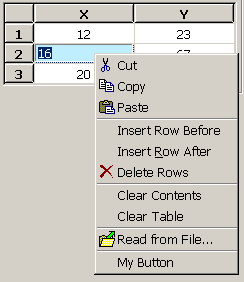
The following example shows how you can enable various popup menu options:
vf = FXVerticalFrame(parent, FRAME_SUNKEN|FRAME_THICK,
     0,0,0,0, 0,0,0,0)
table = AFXTable(vf, 4, 3, 4, 3, None, 0,
    AFXTABLE_NORMAL|AFXTABLE_EDITABLE)

table.setLeadingColumns(1)
table.setLeadingRows(1)
table.setLeadingRowLabels('X\tY')

table.showHorizontalGrid(True)
table.showVerticalGrid(True)

table.setColumnWidth(0, 30)

# Center all columns
table.setColumnJustify(-1, table.CENTER)

table.setPopupOptions(
    AFXTable.POPUP_CUT|AFXTable.POPUP_COPY
   |AFXTable.POPUP_PASTE
   |AFXTable.POPUP_INSERT_ROW
   |AFXTable.POPUP_DELETE_ROW
   |AFXTable.POPUP_CLEAR_CONTENTS
   |AFXTable.POPUP_READ_FROM_FILE
)
table.appendClientPopupItem('My Button', None, self,
    self.ID_MY_BUTTON)
FXMAPFUNC(self, SEL_COMMAND, self.ID_MY_BUTTON, MyDB.onCmdMyBtn)