Running the prototype application | ||
| ||
The SIMULIA Community (SIMUILA Community > Learning Resources > 3DEXPERIENCE and Traditional Products > Abaqus > Plug-ins/Scripts) provides examples of plug-ins and customized applications as well as access to a community of users that fosters the advance of the Abaqus Scripting Interface and the Abaqus GUI Toolkit. Search in this community for “Prototype Example” to download the zip file for the prototype application, then unzip the files and go to the directory containing the files that you downloaded. To use the prototype application, open the file testDB.py in a text editor. From the system prompt, enter the following:
abaqus cae -custom prototypeApp -noStartup
The -custom parameter indicates that you are
executing an application that is a customized version of
Abaqus/CAE.
The -noStartup parameter indicates that you want
to start
Abaqus/CAE
without displaying the startup screen. For more information, see
Abaqus/CAE Execution.
The application creates two icons in the toolbox, as shown in Figure 1.
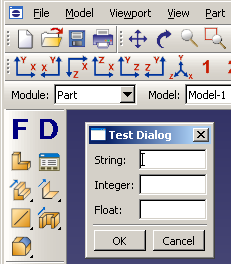
The
 icon reloads the form code (testForm.py); the
 icon reloads the dialog box code (testDB.py).
If you make changes to the form code, click on the
icon to reload that file. If you make changes to the dialog box
code, click on the
icon to reload that file. You do not need to exit and restart
Abaqus/CAE
to see your changes in the form or dialog box.
icon reloads the dialog box code (testDB.py).
If you make changes to the form code, click on the
icon to reload that file. If you make changes to the dialog box
code, click on the
icon to reload that file. You do not need to exit and restart
Abaqus/CAE
to see your changes in the form or dialog box.
For example, try the following:
-
Click the
icon to post the dialog box and note the text labels shown in
the dialog box.
-
Click in the dialog box to unpost it.
-
Change one of the labels in testDB.py and save the file.
-
Click the
icon to post the dialog box again. You will see the modified
label in the dialog box.
When you click in the dialog box, the kernel command issued by the dialog box is written to the message area, rather than being executed by Abaqus/CAE. This allows you to debug the command before you try to execute it in the kernel.
After you have debugged your form and dialog box code, you can modify the
form to issue the command to the kernel by following the example in
Form example.
You can connect the form to your GUI, instead of to the
icon, by following the example shown in
Examining a GUI module example.