Define Symmetry Conditions in Tosca Structure.gui
- Choose Command > LINK_TOPO.
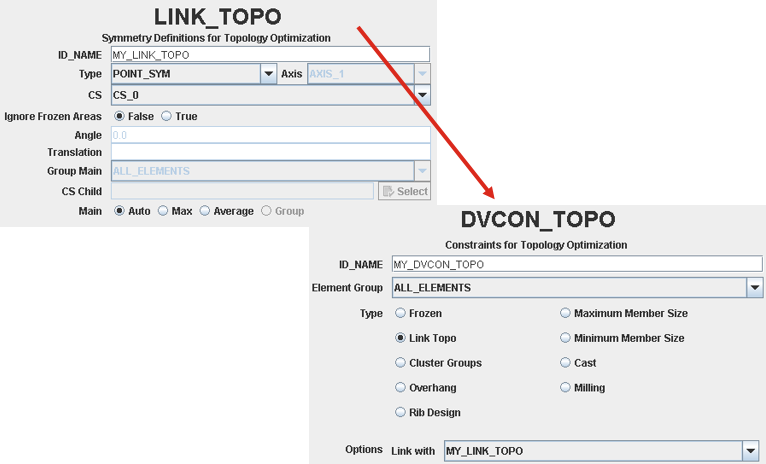
- In the LINK_TOPO menu, define the type of symmetry, the coordinate system and, if required, the rotation angle (in case of rotation symmetry) or the translation distance (in case of cyclic symmetry). The frozen elements of one area are also considered as frozen for the linked areas. If this behavior is not wanted the frozen areas can be ignored in the symmetry restriction by setting the ignore frozen area check box to true.
- Select Command > DVCON_TOPO.
-
In the DVCON_TOPO dialog, apply the defined LINK_TOPO to an element group as shown in the following figure:
-
The corresponding parameter file looks like:
LINK_TOPO
  ID_NAME     = <Name of LINK_TOPO object>
  CS          = <Name of the reference coordinate system>
  TYPE        = <Type of symmetry>, <axis>
  TRANSLATION = <Translation for cyclic symmetry>
  ANGLE       = <Segment angle for rotation symmetry>
END_

DVCON_TOPO
  ID_NAME     = <Name of DVCON_TOPO object>
  EL_GROUP    = <Element group to be restricted>
  CHECK_TYPE  = LINK_TOPO
  CHECK_LINK  = <Name of LINK_TOPO definition>
END_
More than one symmetry condition can be defined for an element group. Geometrically, different combinations must be feasible.
Important: The FE mesh does not have be symmetric. The restriction can also be applied to unstructured meshes or to tetrahedron meshes. The elements should have nearly the same size because the result is the resolution of the coarsest part of the mesh. It is possible that the linked elements are not determined correctly if the size of the elements differs too much.