Configurable Driver-Properties | ||
| ||
Introduction and Overview
A Python object called driver is exposed to the user by the
DRIVER-command. The usual syntax of accessing the members or properties of
this object is as follows:
DRIVER
driver.Logger.LogLevel = LogLevels.DEBUG
driver.Modules[ ToscaModules.TOSCA_PREP ].Path = r'e:\FE_APP\TOSCA\SMATsoToscaPrep.exe'
END_
The driver-object contains further Python-objects. An overview of the hierarchy of all available objects looks as follows:
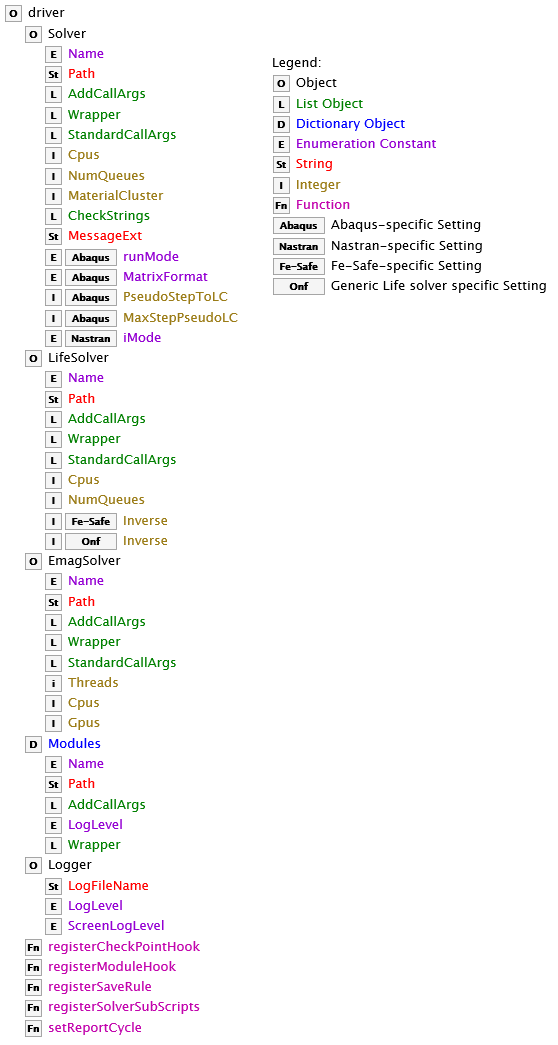
The squared letters (shown also in the Legend) correspond to the different types of the Python-objects. A detailed explanation of the different objects is provided in the sections below.
driver.Solver
The driver.Solver object provides access to the settings of the FE-solver
used for the optimization. This object can have additional or different members for some
solvers. For example, the driver.Solver.MatrixFormat is used only in the
context of the Abaqus solver and is ignored for other solvers.
|
Name |
Data Type |
Range of Values |
Description |
Default Value |
|---|---|---|---|---|
|
|
Enumeration constant |
|
Identifies the solver used for the optimization. |
|
|
|
String |
For example, |
Points to the full path of the main solver executable file. |
Installation/configuration setting |
|
|
String |
For example, |
The identifier of the specific FE-solver version. Can be used in combination with
|
Unset or value of command-line argument |
|
|
List of Strings |
Arbitrary strings containing solver-specific command-line arguments. Example: |
Allows addition of command-line arguments to the solver call. |
Empty list |
|
|
List of Strings |
Refer to the section: Defining Wrappers for Executable Modules |
Provides a way to execute the solver as a child process of a given tool. |
Empty List |
|
|
List of Strings |
Arbitrary strings containing solver-specific command-line arguments. Example: |
Allows overwriting of the default command-line arguments for the solver. |
Installation/configuration setting |
|
|
Integer |
1, 2, 3, ... |
Defines the number of CPUs to be used by the solver. |
1 |
|
|
Integer |
1, 2, 3, ... |
Defines the maximum number of solver-tasks to be executed simultaneously. |
1 |
|
|
Integer |
Non-negative integer, typical values: 10,000..100,000 |
Defines the maximum number of materials (after reduction) in the modified input file. More materials improve the resolution of the optimization method, but might slow down the solver preprocessor. If no value is provided, the default value of 10,000 is assumed and used internally. Enter a value of 0 to disable clustering of materials and thus use a separate material for each element. |
Unset; per default 10,000 is enforced. |
|
|
List of Two Strings |
Solver-specific string messages to look for in the solver output. The first string corresponds to solver success, and the second string corresponds to solver failure. |
Redefinition of these strings enables the user to change the criterion for determining whether the solver run succeeded or failed. Example: a value of A value of |
Installation/configuration setting |
|
|
String |
A valid file extension string. |
Redefinition of the file extension of the solver message file. Example: |
Installation/configuration setting |
|
(Abaqus-specific)(Obsolete) |
Enumeration constant |
This option is obsolete. To enforce a specific run mode use
|
||
|
(Abaqus-specific) |
Enumeration constant |
|
Prescribes which file format is used for the transfer of elemental stiffness matrices from Abaqus to Tosca Structure. |
|
|
(Abaqus-specific) |
Integer (Boolean) |
0 or 1 |
Triggers the automatic conversion of Abaqus linear *STEP-commands into *LOADCASE commands for improved solver performance. |
1 |
|
(Abaqus-specific) |
Integer |
Arbitrary integer value |
Establishes a limit for the number of Abaqus *LOADCASE keywords to be used within one *STEP-keyword. A negative value or zero indicates that the limit is disabled. |
-1 |
|
(Abaqus-specific) |
Integer (Boolean) |
0 or 1 |
Controls whether Tosca should remove output requests defined in the input file that are not used by the optimization. Can be used to improve performance. |
0 |
|
(Nastran-specific) |
Enumeration constant |
|
Defines the mode for the Nastran-solver (I4 or I8). |
|
driver.LifeSolver
The driver.LifeSolver
object provides access to the settings that are specific to the different Life-solvers that
are supported by Tosca Structure.
driver.LifeSolver object is derived from the
driver.Solver object and thus most of the settings are identical between
driver.LifeSolver and driver.Solver. This section only shows
the settings unique to the Life-Solvers. |
Name |
Data Type |
Range of Values |
Description |
Default Value |
|---|---|---|---|---|
|
|
Enumeration constant |
|
Identifies the life solver used for the optimization. |
|
|
|
Integer (Boolean) |
0 or 1 |
Trigger an inverted value interpretation for the Damage-value. |
1 |
driver.EmagSolver
The driver.EmagSolver
object provides access to the settings that are specific to the different EMAG solvers that
Tosca Structure supports.
driver.EmagSolver object is derived from the
driver.Solver object. Thus, most of the settings are identical between
driver.EmagSolver and driver.Solver. This section only shows
the settings unique to the EMAG Solvers. |
Name |
Data Type |
Range of Values |
Description |
Default Value |
|---|---|---|---|---|
|
|
Enumeration constant |
|
Identifies the EMAG solver used for the optimization. |
|
|
|
Integer |
1, 2, 3, ... |
Number of parallel threads that should be used by the EMAG solver. |
1 |
|
|
Integer |
1, 2, 3, ... |
Number of CPU cores that should be used by the EMAG solver. |
1 |
|
|
Integer |
1, 2, 3, ... |
Number of GPU cores that should be used by the EMAG solver. |
0 |
driver.Modules
The driver.Modules dictionary gives access to the setup of the Tosca Structure executable modules. The user can replace one or mode modules for a specific optimization
run. For a list of the modules, refer to the Redefinition of the Tosca Modules section.
|
Name |
Data Type |
Range of Values |
Description |
Default Value |
|---|---|---|---|---|
|
|
Enumeration constant |
|
Read-only name of the module, used as an index for the dictionary. Basically
identical to These values are explained in more details in the Redefinition of the Tosca Modules section. |
Installation/configuration setting |
|
|
String |
A valid path to a file |
Established an alternative execution module. |
Installation/configuration setting |
|
|
List of Strings |
Arbitrary strings containing module specific command-line arguments. Example: |
Allows addition of command-line arguments to the module call. |
Empty list |
|
|
Enumeration constant |
... (same as |
Establishes a new log-level setting for the module. |
Inherit global log-level for the run: value copied from
|
|
|
List of Strings |
Refer to the section: Defining Wrappers for Executable Modules |
Provides a way to execute the module as a child process of a given tool. |
Empty List |
driver.Logger
The driver.Logger object allows modification of the logging settings of
the Tosca Structure run.
|
Name |
Data Type |
Range of Values |
Description |
Default Value |
|---|---|---|---|---|
|
|
String |
A valid path to a file |
Redirect the log-output to a new file. Note that some messages - output before the setting of the new log-file - might end up logged in the default log file. |
For optimization: TOSCA.OUT For postprocessing: TOSCA_POST.OUT For info output: TOSCA_INFO.OUT |
|
|
Enumeration constant |
|
Establish a new log-level for output printed by the control itself. The modules loglevel need to be set separately. The below snipped sets all modules to loglevel DEBUG: Some messages—output before the setting of the new log-level might be logged with a different log-level. Changes to the loglevel are only activated if it is not set as a command-line
argument ( |
|
|
|
Enumeration constant |
... (same as |
Establish a new global log-level for the console output. Some messages - output before the setting of the new log-level - might be displayed with a different log-level. |
|
driver.registerSaveRule( Type, Checkpoint, Frequency, FilePattern, Directory,
        Suffix, Bundle )
The driver.registerSaveRule method allows the user to add rules for saving
files to and from the Tosca Structure working directory.
|
Parameter |
Data Type |
Range of Values |
Description |
Default Value |
|---|---|---|---|---|
|
|
UpdateRules Enum |
|
Specifies the action the SaveRule performs. |
Required by user |
|
|
CheckPoints Enum |
|
A checkpoint is a specific point during the optimization process. |
Required by user |
|
|
List of EventTimes Enum Entries or EventTimes Enum Entry or (EventTimes Enum Entry, Integer) |
|
An EventTimes entry always refers to a design cycle. For example,
|
Required by user |
|
|
List of Strings |
Special characters:
|
Defines the files that are effected by the SaveRule. If an entry is not an
absolute path it is relative to the working directory of the job. For example,
|
If Type is
if Type is Required by user |
|
|
String |
The directory to which the SaveRule copies/moves the specified files. |
Working directory of the job. |
|
|
|
String |
Special characters:
|
The files being stored are renamed by adding a suffix to the base file name. If
|
None |
|
|
Boolean |
|
Controls if the suffix is appended to every file or if a sub-sub-directory is
created. The subdirectory is named like the suffix and is located inside
|
False |
Use cases:
- Copy Files to working directory:
The following command copies test.txt from C:\Documents\test.txt to the working directory before the optimization begins.
driver.registerSaveRule( UpdateRules.COPY, CheckPoints.OPT_BEGIN, EventTimes.EVER, [r"E:\Documents\test.txt"], "" ) - Copy files from working directory:
The following SaveRule copies all odb files present in the working directory to the subdirectory SAVE.inp.
driver.registerSaveRule( UpdateRules.COPY, CheckPoints.CYCLE_COMPLETE, EventTimes.EVER, ["*.odb"], "SAVE.odb", "copied_in_%i", False )It is executed at the end of every design cycle. All files copied have the suffix "copied_in_%i" appended to their name where %i is replaced by the corresponding design cycle number.
- Overwrite a SaveRule defined in a system-wide configuration that cannot be changed for
a single user
Here, the first SaveRule is overwritten by the second one. All files are moved over to AnOtherDir.
DRIVERdriver.registerSaveRule( UpdateRules.MOVE, CheckPoints.CYCLE_COMPLETE, EventTimes.EVER, ["*.msg"], "SAVE.inp", "_%i", False )driver.registerSaveRule( UpdateRules.MOVE, CheckPoints.CYCLE_COMPLETE, EventTimes.EVER, ["*.msg","*.odb"], "AnOtherDir", "_%i", False )END_Remarks on overwriting SaveRules:
-
The order counts. SaveRules registered last are overwriting rules defined earlier.
-
In order for one SaveRule to completely overwrite another rule the parameters
Type,CheckpointandFrequencymust match. -
To partially overwrite a SaveRule the
Frequencymight differ. For example:DRIVER driver.registerSaveRule( UpdateRules.MOVE, CheckPoints.CYCLE_COMPLETE, EventTimes.EVER, ["*.msg"], "SAVE.msg", "_%i", False ) driver.registerSaveRule( UpdateRules.MOVE, CheckPoints.CYCLE_COMPLETE, EventTimes.FIRST_LAST, ["*.msg"], "AnOtherDir", "_%i", False ) END_Here, the first SaveRule is partially overwritten. Only in the first and last design cycle .msg files are saved in AnOtherDir. In all other design cycles they are saved into SAVE.msg.
-
- Disable SaveRules
To disable a SaveRule, copy it and change the
FrequencytoEventTimes.NEVER.DRIVER driver.registerSaveRule( UpdateRules.MOVE, CheckPoints.CYCLE_COMPLETE, EventTimes.EVER, ["*.msg"], "SAVE.msg", "_%i", False ) driver.registerSaveRule( UpdateRules.MOVE, CheckPoints.CYCLE_COMPLETE, EventTimes.NEVER, ["*.msg"], "AnOtherDir", "_%i", False ) END_EventTimes.NEVERalways has priority. The following SaveRule is never executed:DRIVER driver.registerSaveRule( UpdateRules.MOVE, CheckPoints.CYCLE_COMPLETE, [ EventTimes.EVER, EventTimes.NEVER ], ["*.msg"], "SAVE.msg", "_%i", False ) END_ - Keeping only the last working version of a file
If you want to preserve disk space you can use
EventTimes.LASTinstead ofEventTimes.EVER. For example, the following SaveRule only ever keeps one version of result.odb in the SAVE.odb directory. During design cycle 5, result_004.odb can be found in SAVE.odb. Once the 5th design cycle is completed, the SaveRule updates the file from result_004.odb to result_005.odb.DRIVER driver.registerSaveRule( UpdateRules.MOVE, CheckPoints.CYCLE_COMPLETE, EventTimes.LAST, ["result.odb"], "SAVE.odb", "_%i", False ) END_EventTimes.LASTcan be combined with bundling and other EventTimes. The next rules behavior is to keep always the latest result.odb and, in addition, result.odb from design cycle 3 (named result_003.odb).DRIVER driver.registerSaveRule( UpdateRules.MOVE, CheckPoints.CYCLE_COMPLETE, [ EventTimes.LAST, (EventTimes.NTH, 3 ) ], ["result.odb"], "SAVE.odb", "_%i", False ) END_
driver.registerModuleHook /
driver.registerCheckPointHook
These functions are used to attach user-scripts to different points of the Tosca Python workflow. Refer to section User Script Entry Points ("Hooks") for a comprehensive documentation of these functions.
driver.setReportCycle( PostTypes, EventTimes )
The driver.setReportCycle method allows the user to add reporting steps
to be performed at the end of specific design cycles.
-
PostTypescan be one of the following:PostTypes.REPORT: Generates a .vtfx reportPostTypes.SMOOTH: Generates a smooth isosurfacePostTypes.ONF_2_SIM: Generates an optimization report in .sim file format) -
EventTimescan be one of the following:EventTimes.EVER: Every timeEventTimes.NEVER: NeverEventTimes.FIRST: Only the first timeEventTimes.LAST: Only the last timeEventTimes.FIRST_LAST: Only the first and the last timeEventTimes.NTH: Only once, the Nth-timeEventTimes.FREQ: Every Nth-time
Here is an example of setReportCycle that generates a .vtfx report file
after every design cycle and one .sim file at the end of design cycle 5.
DRIVER
driver.setReportCycle( PostTypes.REPORT, EventTimes.EVER )
driver.setReportCycle( PostTypes.ONF_2_SIM, (EventTimes.NTH, 5) )
END_
driver.registerSaveRule( UpdateRules.COPY, CheckPoints.CYCLE_COMPLETE, [ EventTimes.FIRST_LAST, (EventTimes.NTH,1) ], [ '*.odb' ], 'SAVE.odb', '_%i', bundle=True )
driver.registerSolverSubScripts( Solver, SubmitScriptCmd, CheckScriptCmd,
        CheckInterval, JobTimeout )
The driver.registerSolverSubScripts method allows the user to submit the
FE or Life solver run to a cluster system. The user must supply two scripts, a submit script
and a script checking the remote execution status. Also, once the checkScripts return value
is zero Tosca resumes its execution expecting all relevant result files are located in the local
working directory.
-
Solvercan be one of the following:FeSolvers.ABAQUSFeSolvers.MSCNASTRANLifeSolvers.FESAFE -
The
SubmitScriptCmdis a Python string containing the system call that is used to call the submit script. The supplied string is appended by the argument list of the solver call (as configured by Tosca). -
The
CheckScriptCmdis a Python string containing the system call that is used to call the script checking if the remote execution is still running.The return values of the check script are interpreted by Tosca as:
0: Remote execution finished
1: Remote execution still running
>1: Remote execution error
-
CheckIntervalis an integer(default: 30) and represents the time in seconds Tosca is waiting before it calls the check script again. -
JobTimeoutis an integer(default: 60) and represents the time in minutes Tosca is allowed to wait for a remote execution to finish until it terminates the optimization.
Here is an example of registerSolverSubScripts that runs
ABAQUS on a remote system:
DRIVER
 driver.registerSolverSubScripts( FeSolvers.ABAQUS, "submitAbaqus.py", "checkStatus.py", 30, 60 )
END_