-
To set the Design Area, create a Design Variable (DV_TOPO) with the predefined ALL_ELEMENTS group:
DV_TOPO
  ID_NAME               = design_variables
  EL_GROUP              = ALL_ELEMENTS
END_
Thus, the optimization task might modify all elements of the model.
-
To set the Frozen Area, do the following:
-
Define the elements that the optimization task might NOT modify in a Group Definition (GROUP_DEF):
GROUP_DEF
  ID_NAME               = frozen_elements
  TYPE                  = ELEM
  FORMAT                = LIST
  LIST_BEGIN
  1-109, 218-3815:109, 3816-3924
END_
-
Reference the Group Definition as element group in a Design Variable Constraint (DVCON_TOPO) and set them as frozen:
DVCON_TOPO
  ID_NAME               = dvcon_frozen
  EL_GROUP              = frozen_elements
  CHECK_TYPE            = FROZEN
END_
-
To set the Objective Function, do the following:
-
Define a Design Response for the compliance of the structure (DRESP).
DRESP
  ID_NAME               = DRESP_SUM_ENERGY
  DEF_TYPE              = SYSTEM
  TYPE                  = STRAIN_ENERGY
  UPDATE                = EVER
  EL_GROUP              = ALL_ELEMENTS
  GROUP_OPER            = SUM
END_
-
Reference the Design Response in the Objective Function (OBJ_FUNC).
OBJ_FUNC
  ID_NAME               = maximize_stiffness
  DRESP                 = DRESP_SUM_ENERGY
  TARGET                = MINMAX
END_
-
To set a volume constraint, do the following:
-
Define a Design Response (DRESP) that refers to the initial volume of the design.
The initial volume is the sum of all elements.
DRESP
  ID_NAME               = DRESP_VOL_TOPO
  DEF_TYPE              = SYSTEM
  TYPE                  = VOLUME
  UPDATE                = EVER
  EL_GROUP              = ALL_ELEMENTS
  GROUP_OPER            = SUM
END_
-
Define an equality constraint (CONSTRAINT) that references the Design Response and constrains it to 45 % of its initial volume.
CONSTRAINT
  ID_NAME               = volume_constraint
  DRESP                 = DRESP_VOL_TOPO
  MAGNITUDE             = REL
  EQ_VALUE              = 0.45
END_
-
To set the Optimization Task, link the Design Variables to the Objective Function and constraints:
OPTIMIZE
  ID_NAME               = topology_optimization
  DV                    = design_variables
  OBJ_FUNC              = maximize_stiffness
  DVCON                 = dvcon_frozen
  CONSTRAINT            = volume_constraint
END_
-
To improve the convergence, set additional parameters for the optimization (OPT_PARAM):
OPT_PARAM
  ID_NAME               = optimization_parameters
  OPTIMIZE              = topology_optimization
  SPEED                 = SLOW
  START_DELETE          = PERC,0.2
END_
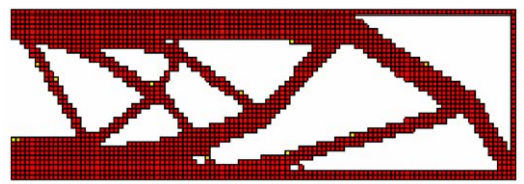
After 15 iterations, the optimization result looks as follows: